Dinkytown AutoSave
AutoSave preserves all calculator entries automatically — come back later with all inputs intact, no starting over.
All calculators now use “Dinkytown AutoSave”. This great feature allows you to exit the calculator and then come back later, with all entries preserved. No more starting over!
Features include:
- Works on phones, tablets and computers.
- All data is stored on your computer or device — no data is sent over the internet or stored in the cloud. No server-side data breach can ever expose your data.
- To clear any AutoSave data you can simply clear your browser's cache or clear the browser's LocalStorage.
- Currently available on all calculators — nothing new to set up.
Dinkytown AutoSave and Email
The Dinkytown AutoSave and Email option lets you do even more. You can:
- Reset the calculator to defaults.
- Email data.
- Save multiple data sets.
The AutoSave Menu option is available as an add-on for any licensed package of calculators. Already have a package and want to add the Menu option? Please email us at:
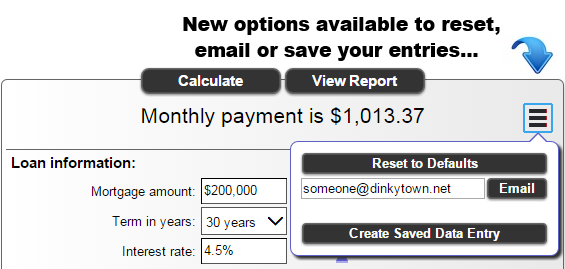
It all starts by clicking the menu:
The menu icon is available on all of our calculators. Clicking it opens up a whole new dimension, only found on Dinkytown calculators.
Reset to Defaults
Sometimes you just need to completely start over. Click the “Reset to defaults” button to reload all of the calculator's default values.
Email someone
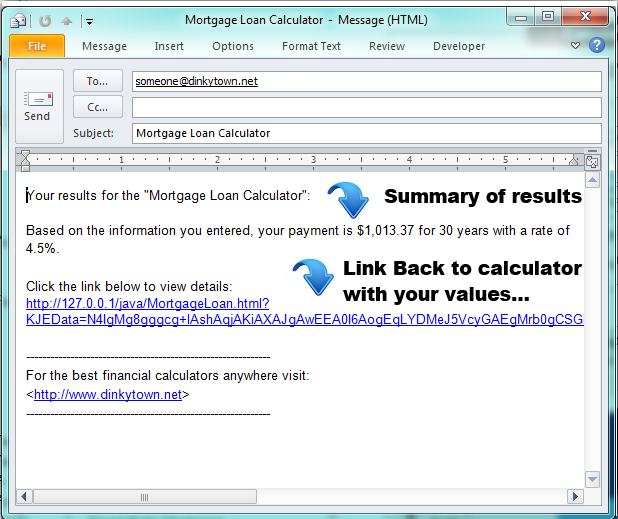
Click the “Email” button to create an email. Your device's email program will open with a new email formatted as a short calculator summary. In addition, a special link will appear that links directly to the original calculator page with all of your entries pre-filled and calculated. This is perfect for emailing clients, friends or even yourself. The encrypted data link does not rely on Dinkytown.net and will link to the website that originally was used to create the email.
Save a copy
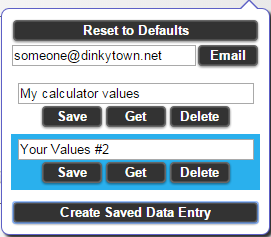
The original Dinkytown AutoSave still saves your data as you make changes. The menu also lets you save a copy at any time that you can retrieve later. Up to 10 data sets are allowed for each calculator. Just like the original AutoSave, no data is ever transmitted over the internet and nothing is saved to a server. All data is stored locally and encrypted within your browser.